

VisaFlo records the movement in the ledger — it does not send the money. Use it after (or as) you make the real payment from the trust bank account.
Open the form
- Open Trust Accounting → Transactions and press Record.
- Choose Pay a bill for the client.
Fill in the payment
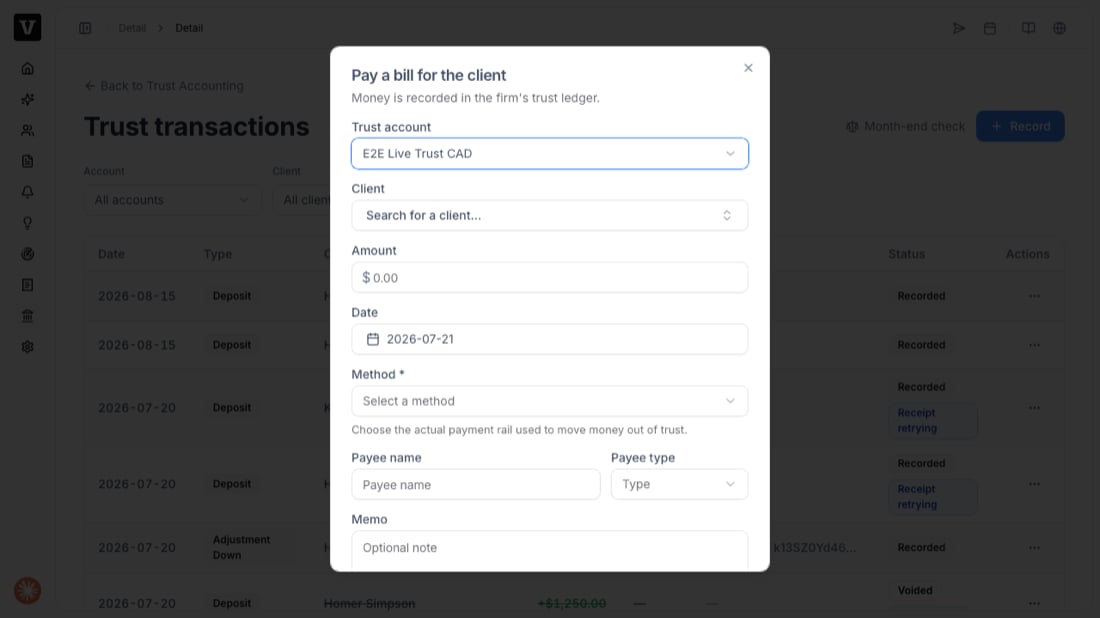
- Trust account — the account the money leaves.
- Client — whose trust money is being spent.
- Amount and Date.
- Method — the actual payment rail used to move money out of trust (e.g. cheque, EFT).
- Payee name and Payee type — who received the money.
- Memo — an optional note for your records.
Fixing a mistake
You never edit or delete a recorded payment. Open the transaction’s actions menu and void it — VisaFlo posts an equal, opposite entry so both stay on the record. You can’t void a payment that falls in a month you’ve already reconciled (that period is locked); post a correcting entry in the current open month instead.Troubleshooting
- “Insufficient funds” — the client’s trust balance is lower than the amount. Check the client’s ledger before paying.
- Payment is in a locked period — you’re recording into a month that’s already been reconciled. Use the current open month.
- A lawyer EFT asks for a requisition — LSO/LSBC EFT disbursements require an approved requisition; provide it before recording.