

Trust accounting supports CICC (RCIC), LSO (Law Society of Ontario), and LSBC (Law Society of BC). The exact fields and rules you see depend on the regulator you select in settings.
The home screen
Open Trust Accounting from the sidebar. The home screen shows what needs your attention, your accounts and balances, and the actions you use most.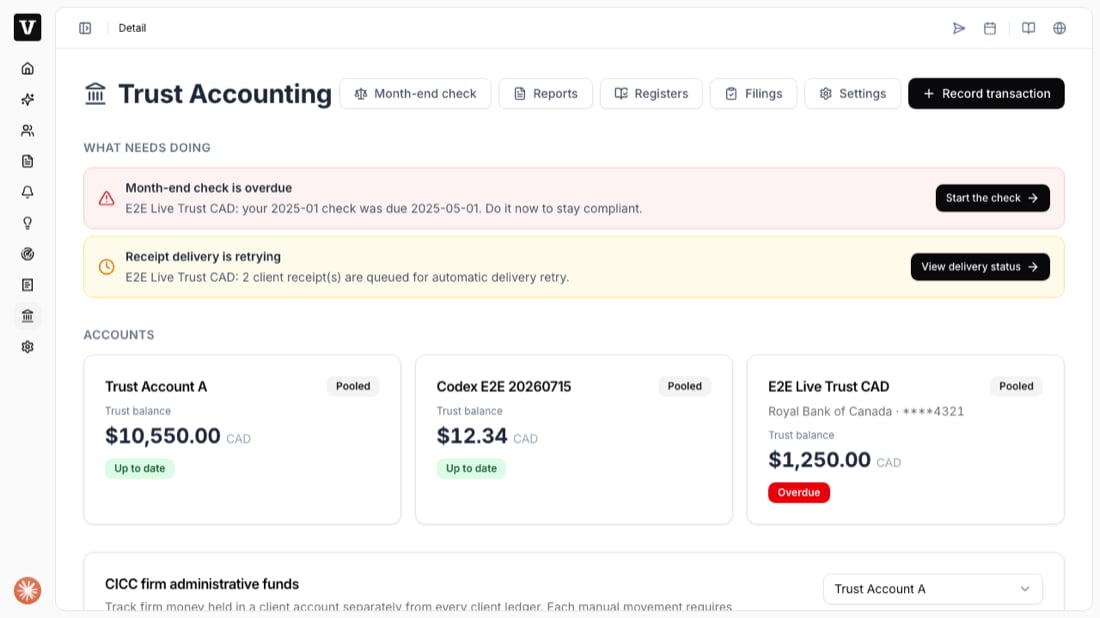
- What needs doing — overdue month-end checks and receipts that are retrying, with a one-click action for each.
- Accounts — every trust account with its balance and an Up to date / Overdue status.
- Record transaction — the button you use to record a deposit, pay a bill, take an earned fee, refund, or transfer.
- Month-end check, Reports, Registers, Filings, Settings — the tabs across the top.
What you can do here
Before you start
Your firm’s regulator and trust settings must be configured first. If you have not done this yet, start with Set up a trust account. Once an account is ready, record your first deposit.The ledger is append-only: you never edit or delete a recorded transaction. To fix a mistake you void it, which posts an equal, opposite entry — both stay on the record so your audit trail is always complete.