
A practical migration framework for solo and small RCIC firms moving from spreadsheets to case management software, including three failure modes, a data model checklist, and a parallel-run plan.

There are three signs a spreadsheet has outgrown an immigration practice. The first is recoverable. The second is recoverable with effort. The third is the one that quietly accumulates risk on every active file until something forces a reckoning — usually a complaint, a discovery request, or a CICC inquiry asking for a chronology you cannot produce.
The catalogue below isn't a panic argument. Solo and small RCIC firms run on spreadsheets for good reasons. They're free, they're flexible, they don't impose a workflow before you've figured out your own, and a single tab can hold every active file for the first eighteen months of practice. The problem is that the tool's strengths are also its boundaries. As a system of record for personal data covered by PIPEDA, for retainer obligations regulated by CICC's Code of Professional Ethics, and for time-sensitive IRCC deadlines, the spreadsheet has structural limits that don't appear in feature comparisons. They appear in failure modes — and once you start seeing them, you can't unsee them.
Failure mode one: no version safety
A spreadsheet has one cell per data point and one current value per cell. The instant a value is overwritten, the previous value is gone. There is undo within a session and there is the file's last saved snapshot, but neither is an audit trail. Neither tells you who changed the field, when, or why.
For most files this is fine. The client's date of birth doesn't change. The passport number doesn't change. But the data points that do change are exactly the ones a practitioner needs to defend later: status as of a given date, the version of the retainer in force when a fee was charged, the IRCC processing stage that triggered a particular client communication, the deadline calculation that drove a filing decision. When a complaint or an E&O claim arrives twelve months after the fact, the question isn't what the value is now — it's what the value was when the decision was made.
The workaround most firms reach for is duplicate tabs or duplicate files. A "client list as of January" tab. A "retainer log v2" tab. Eight months in, the duplication itself becomes the problem. Two tabs disagree about a client's status. Three versions of the same retainer log exist on three different machines. The act of trying to compensate for the missing version safety creates the audit nightmare it was meant to prevent.
A case management system designed for regulated practice handles this at the data layer. Every change is logged with timestamp and user. The current value is what you see; the historical values are queryable when you need them. You don't think about it during normal operation, which is the point — version safety becomes invisible infrastructure rather than a discipline you have to maintain by hand.
Failure mode two: no permission scoping
A spreadsheet has two access states: people who can open the file, and people who can't. Once someone has the link, they can see every row. They can see the unrelated client whose case has nothing to do with theirs. They can see your fee history, your refusal log, your private notes on the third file they didn't even know existed.
For a single-person practice with no contractors, this might not matter operationally. It still matters from a privacy posture standpoint, because PIPEDA expects access to personal information to be limited to what's necessary for the stated purpose. But the moment you bring in a paralegal, a junior consultant, a virtual assistant, an articling student, or a referral partner — any second person who needs to touch any file — the absence of row-level permission becomes a real exposure.
Sharing the whole sheet is over-disclosure. Splitting the sheet into per-person copies recreates the version safety problem. Filtering on share doesn't restrict edit access at the data layer. None of these solve the actual requirement, which is: this user should see exactly the files assigned to them, no more, no less, and the assignments should be auditable.
Case management software solves permission scoping the way it was designed to be solved — at the row and field level, not at the document level. A paralegal sees the files they're assigned to. A referral partner sees only the lead they referred. A reviewer sees the document under review without seeing the rest of the file unless granted. Beyond compliance, this matters when a CICC complaint asks who had access to a record on a given date. The answer needs to be specific. A spreadsheet's answer is "anyone who had the link," which is not the answer you want on the record.
Failure mode three: no event triggers — and this is the costly one
A spreadsheet stores values. It does not act on them. A row sits in a tab containing a deadline, a follow-up date, an LOA date, a biometrics window, a PFL response date, and the row will sit there indefinitely. Nothing in the spreadsheet itself notices that today is the date. Nothing tells the file owner. Nothing escalates if the date is missed.
The substitute is human discipline — a daily review, a calendar that mirrors the spreadsheet, a colour-coded conditional format that turns a cell red when the deadline is within seven days. These work right up until they don't. They fail on the week the practitioner is sick. They fail when the spreadsheet is closed for two days because someone is travelling. They fail when the deadline is in a column that wasn't included in the conditional format because it was added six months later.
The structural issue is that a spreadsheet has no concept of an event. It has cells. Cells contain dates, and dates compared to today produce a number, but the comparison only happens when someone looks at it. There is no listener. There is no thing inside the system whose job is to notice.
This is the failure mode that most often shows up as a missed PFL window, a missed extension filing, a forgotten passport-request response, a client whose biometrics expired without being re-scheduled. None of these are dramatic on the day they happen. They become dramatic at the refusal letter, at the JR consultation that gets declined because the underlying error wasn't appealable, at the E&O notification, at the CICC complaint that arrives nine months later asking for the file chronology and finding a gap nobody can explain.
A system that triggers on events handles this differently. The deadline isn't a cell — it's a registered event with an owner, a notification rule, and an escalation path. When the date arrives, something happens whether or not anyone opens the file. When the date is approaching, the right person sees it. When the date passes without action, the file moves into a state that can't be ignored. The discipline isn't outsourced to the practitioner's morning routine; it's built into the data model itself.
What you actually need from case management software
Once the failure modes are named, the requirements clarify themselves. Resist the urge to evaluate platforms on feature lists. Evaluate them on three dimensions instead.
A data model that matches an immigration file
An immigration file is not a row. It's a small graph. There's a client. There's an application. There's a set of family members with their own status, their own forms, their own dependencies. There's a retainer scoping the relationship. There's a stack of documents tied to specific application requirements. There's a stream of communications. There are deadlines linked to specific procedural steps.
Software that flattens this into a single table loses the structure. Software that models it correctly lets you ask the questions you actually need to ask: every active spousal sponsorship file with a missing IMM 5406, every client with biometrics expiring in the next sixty days, every file where the retainer in force at the time of filing matches the work product produced. None of these are answerable from a spreadsheet without manual reconstruction.
An audit trail that holds up
Every change should be timestamped, attributed, and immutable. This isn't a nice-to-have. It's how you answer the question "what did the file look like on July 14" twelve months after July 14. It's how you defend a fee decision against a complaint. It's how you reconstruct a chronology when an applicant alleges they instructed something different. The audit trail is the system's memory, and a system without it is a system that asks the practitioner to be the memory — which is the situation you're trying to leave.
Integrations that don't manufacture more re-typing
If the case management system can't accept document uploads from the inbox, can't write to the cloud drive where the file already lives, can't read the e-signature output back into the file, and can't carry the same client data into IMM forms and the IRCC online portal — then it has solved the spreadsheet problem and created an integration problem in its place. The point of a system of record is that the record only gets typed once. Anything that re-introduces double entry is a regression dressed in software.
In practice this means looking at where the file's data points actually live: cloud storage for documents, the email account where IRCC correspondence arrives, the e-signature provider for retainers and consents, the billing tool for invoices, and the IRCC online portal and IMM PDF set for the actual filings. The system that earns the central position is the one that connects to all of them.
A migration plan
Migration is the part most firms postpone, often for years, because the spreadsheet keeps working and the migration looks expensive. The expense compounds while the postponement continues. A spreadsheet at 200 active rows is harder to leave than at 50. At 500 rows, the migration plan starts dictating its own timeline.
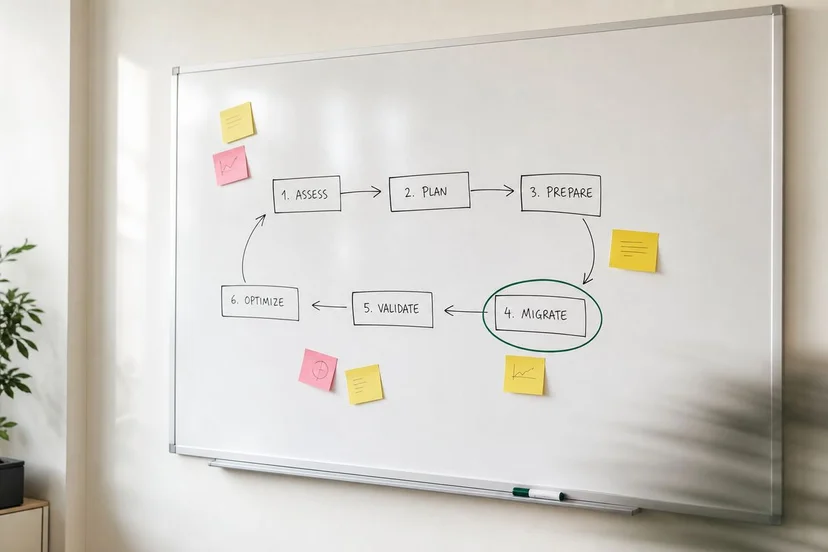
A workable plan has four phases.
Phase one: data export and inventory
Before evaluating any platform, dump the spreadsheet to its rawest export. Look at every column. Categorize each one as core (lives on the client / file / application entity), procedural (deadlines, status transitions, IRCC events), financial (fees, retainers, trust ledger entries), or notational (free-text comments). Free-text columns are the migration trap — they contain the institutional knowledge but resist clean mapping.
Inventory the off-spreadsheet artifacts too. Email threads. Document folders. Signed retainers. Calendar entries. Text-message threads with clients. The spreadsheet is the visible system of record, but the practice runs on six surfaces. Migration that ignores the other five produces a clean new tool surrounded by the same fragmented mess.

Phase two: taxonomy mapping
Before importing a single row, map your existing taxonomy to the new system's data model. Status labels need to map cleanly. File types need to map cleanly. Stage transitions need to map cleanly. Where the new system's vocabulary differs from your spreadsheet's, decide deliberately whether to keep your old terms or adopt the new ones.
Resist the temptation to recreate every spreadsheet column as a custom field on day one. Most of those columns exist because the spreadsheet had no other place to put a piece of information. The new system has structured places for retainer terms, deadlines, contacts, family-member relationships, and document categories. Use them. The custom-field surface should hold what the system genuinely doesn't model — not a verbatim copy of every header you ever invented.
Phase three: parallel-run period
For a defined window — six weeks is a defensible default — run both systems. Every file action gets recorded in both the new system and the spreadsheet. This is annoying. That's the point. The annoyance is what surfaces gaps in the new configuration before the spreadsheet is decommissioned. It's also what prevents the silent failure case where the new system has a hidden defect that doesn't surface until the spreadsheet has been retired and there's nothing to compare against.
During parallel run, weekly reconciliation is non-negotiable. Pick a slot — Friday afternoon works for most practices — and walk through every active file in both systems. Where they disagree, investigate. Most disagreements are configuration gaps; a few will be genuine bugs in the new system. The reconciliation is the only place those gaps become visible before they become silent.
Phase four: cutover and decommission
At cutover, the spreadsheet goes read-only. Not deleted — read-only, archived, kept available for the audit window CICC expects (ten years for client files, longer for trust records). The new system is the source of truth from that date forward. New files are opened only in the new system. Existing files complete their lifecycle there.
Communicate the cutover internally if there's anyone else on the file. The single most common migration failure is the practitioner who switches systems while a paralegal continues updating the old spreadsheet for two weeks because nobody told them to stop.
What to track post-migration
A migration that doesn't measure its own outcomes is hard to defend internally and impossible to improve. Track these for the first ninety days after cutover.
Time per file action. The same actions that took fifteen minutes in the spreadsheet should take less in the new system; if they don't, the configuration needs work. Missed-deadline count. This should drop to zero within thirty days; if a deadline still slips, the event-trigger rules aren't covering the case. Number of times a piece of client data was re-typed across surfaces. This should fall sharply; if it doesn't, an integration is missing or misconfigured. Audit query response time. Pick a question you've actually been asked — "what was the retainer in force on this date" — and time how long it takes to answer in the new system. Under thirty seconds is the bar. Anything slower means the audit trail is technically present but not practically usable.
Pay attention to what you stop doing, too. The Friday-afternoon manual deadline review. The colour-coding maintenance. The duplicate-tab discipline. The shared-link clean-up. These were workarounds for the failure modes. Their disappearance is the real measure of whether the migration worked.
Closing
A spreadsheet outgrows a practice quietly. The failure modes don't announce themselves; they accumulate as small frictions and occasional near-misses until one day the practice is operating on a system whose limits have started shaping the work. Naming the failure modes is the first step. Migrating with a plan — export, mapping, parallel run, cutover — is the second. Tracking the post-migration outcomes is what makes the change durable.
VisaFlo is built specifically for Canadian RCIC and immigration law practices, with a data model that matches an IRCC file, an audit trail that satisfies CICC documentation expectations, and integrations across cloud storage, e-signature, billing, IMM PDF autofill, and the IRCC online portal. If your spreadsheet has started showing the failure modes above, book a demo and see what a calibrated migration looks like for a practice your size.