> ## Documentation Index
> Fetch the complete documentation index at: https://visaflo.ca/knowledge-base/llms.txt
> Use this file to discover all available pages before exploring further.
# Set Up a Trust Account
> Configure your regulator, elect your CICC trust model, and open a trust account before recording any client money.
Before you can record a deposit, VisaFlo needs to know **which regulator you answer to** and **how your firm holds client money**. You do this once in settings, then open your account.
## 1. Choose your regulator and trust model
Open **Settings → Trust Accounting** (or the **Settings** tab on the Trust Accounting home screen).
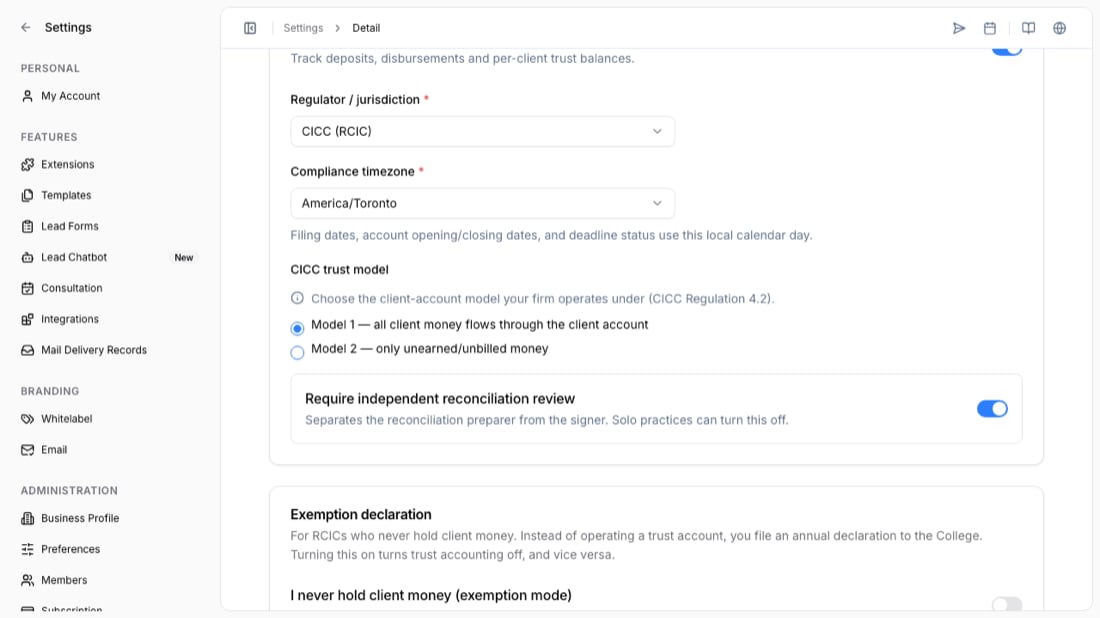 1. Turn on **Enable trust accounting**.
2. Set your **Regulator / jurisdiction** — for immigration consultants this is **CICC (RCIC)**.
3. Set your **Compliance timezone**. Filing dates, account opening/closing dates, and deadline status all use this local calendar day.
4. For CICC firms, choose your **trust model**:
* **Model 1** — all client money flows through the client (trust) account.
* **Model 2** — only *unearned / unbilled* money goes into the trust account; earned-and-billed money must not.
5. Choose whether to **require independent reconciliation review** (the person who signs a month-end check must differ from the person who prepared it). Solo practices can turn this off.
6. **Save Settings**.
Your CICC trust model is set **per audit year (July 1 – June 30)** and **locks the first time client money is received**. Pick the model your firm actually operates under before your first deposit — it cannot be changed once locked.
## 2. Open the trust account
An account is the record of your real trust bank account. Open one from the **Trust Accounting** home screen.
For a CICC account you'll provide:
* **Account name** and **type** — *pooled* (shared across clients) or *separate* (opened for one named client).
* **Bank identity** — bank name, address, and a **masked account number** (all but the last 3–4 digits hidden). A full account number is not accepted.
* **Opened date** — the real date the bank account was opened (it can't default to today).
* **Three CICC attestations** — account title, institution eligibility, and no-lien.
The attestations are **your** confirmations as the licensee. VisaFlo does not inspect bank records or run a lien search, so never treat them as an external verification.
## What comes next
Once your account shows on the home screen with a balance, you're ready to [record a deposit](/knowledge-base/knowledge-base/trust-accounting/record-a-deposit).
## Troubleshooting
* **"CICC deposit classification required" or "received date required" later on** — these come from the trust rules, not a bug. See [Record a deposit](/knowledge-base/knowledge-base/trust-accounting/record-a-deposit).
* **Can't change the model** — it locked on the first client-money receipt for the audit year. A new audit year gets a fresh election.
* **Can't close an account** — the balance, firm funds, and any reserved funds must all be zero, and there must be no transactions or reconciliations dated after the close date.
1. Turn on **Enable trust accounting**.
2. Set your **Regulator / jurisdiction** — for immigration consultants this is **CICC (RCIC)**.
3. Set your **Compliance timezone**. Filing dates, account opening/closing dates, and deadline status all use this local calendar day.
4. For CICC firms, choose your **trust model**:
* **Model 1** — all client money flows through the client (trust) account.
* **Model 2** — only *unearned / unbilled* money goes into the trust account; earned-and-billed money must not.
5. Choose whether to **require independent reconciliation review** (the person who signs a month-end check must differ from the person who prepared it). Solo practices can turn this off.
6. **Save Settings**.
Your CICC trust model is set **per audit year (July 1 – June 30)** and **locks the first time client money is received**. Pick the model your firm actually operates under before your first deposit — it cannot be changed once locked.
## 2. Open the trust account
An account is the record of your real trust bank account. Open one from the **Trust Accounting** home screen.
For a CICC account you'll provide:
* **Account name** and **type** — *pooled* (shared across clients) or *separate* (opened for one named client).
* **Bank identity** — bank name, address, and a **masked account number** (all but the last 3–4 digits hidden). A full account number is not accepted.
* **Opened date** — the real date the bank account was opened (it can't default to today).
* **Three CICC attestations** — account title, institution eligibility, and no-lien.
The attestations are **your** confirmations as the licensee. VisaFlo does not inspect bank records or run a lien search, so never treat them as an external verification.
## What comes next
Once your account shows on the home screen with a balance, you're ready to [record a deposit](/knowledge-base/knowledge-base/trust-accounting/record-a-deposit).
## Troubleshooting
* **"CICC deposit classification required" or "received date required" later on** — these come from the trust rules, not a bug. See [Record a deposit](/knowledge-base/knowledge-base/trust-accounting/record-a-deposit).
* **Can't change the model** — it locked on the first client-money receipt for the audit year. A new audit year gets a fresh election.
* **Can't close an account** — the balance, firm funds, and any reserved funds must all be zero, and there must be no transactions or reconciliations dated after the close date.