> ## Documentation Index
> Fetch the complete documentation index at: https://visaflo.ca/knowledge-base/llms.txt
> Use this file to discover all available pages before exploring further.
# Pay a Bill from Trust
> Record money leaving trust to pay a third party — a government fee or a disbursement — on the client's behalf.
Use **Pay a bill** to record money leaving trust to pay someone on the client's behalf — for example a government filing fee or a disbursement. This is a *disbursement* in trust-accounting terms.
VisaFlo **records** the movement in the ledger — it does not send the money. Use it after (or as) you make the real payment from the trust bank account.
## Open the form
1. Open **Trust Accounting → Transactions** and press **Record**.
2. Choose **Pay a bill for the client**.
## Fill in the payment
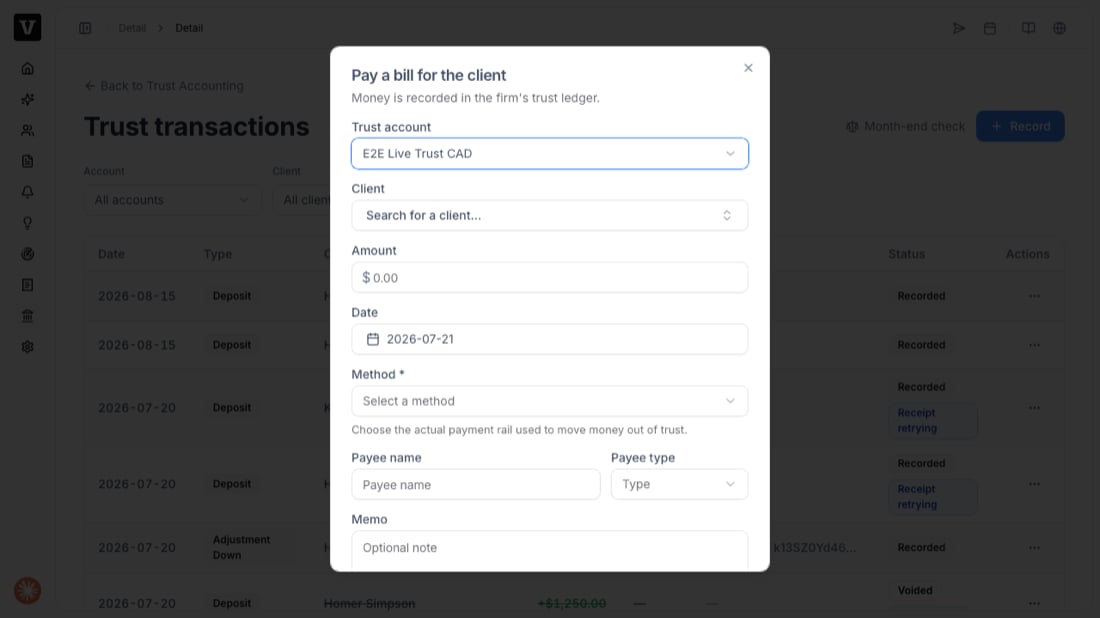 1. **Trust account** — the account the money leaves.
2. **Client** — whose trust money is being spent.
3. **Amount** and **Date**.
4. **Method** — the actual payment rail used to move money out of trust (e.g. cheque, EFT).
5. **Payee name** and **Payee type** — who received the money.
6. **Memo** — an optional note for your records.
Press **Record**. The client's trust balance goes down by the amount.
You can only spend what the client holds. If the amount is more than that client's trust balance, the payment is refused (**Insufficient funds**) — trust money can never be borrowed from another client.
## Fixing a mistake
You never edit or delete a recorded payment. Open the transaction's actions menu and **void** it — VisaFlo posts an equal, opposite entry so both stay on the record. You can't void a payment that falls in a month you've already reconciled (that period is locked); post a correcting entry in the current open month instead.
## Troubleshooting
* **"Insufficient funds"** — the client's trust balance is lower than the amount. Check the client's ledger before paying.
* **Payment is in a locked period** — you're recording into a month that's already been reconciled. Use the current open month.
* **A lawyer EFT asks for a requisition** — LSO/LSBC EFT disbursements require an approved requisition; provide it before recording.
1. **Trust account** — the account the money leaves.
2. **Client** — whose trust money is being spent.
3. **Amount** and **Date**.
4. **Method** — the actual payment rail used to move money out of trust (e.g. cheque, EFT).
5. **Payee name** and **Payee type** — who received the money.
6. **Memo** — an optional note for your records.
Press **Record**. The client's trust balance goes down by the amount.
You can only spend what the client holds. If the amount is more than that client's trust balance, the payment is refused (**Insufficient funds**) — trust money can never be borrowed from another client.
## Fixing a mistake
You never edit or delete a recorded payment. Open the transaction's actions menu and **void** it — VisaFlo posts an equal, opposite entry so both stay on the record. You can't void a payment that falls in a month you've already reconciled (that period is locked); post a correcting entry in the current open month instead.
## Troubleshooting
* **"Insufficient funds"** — the client's trust balance is lower than the amount. Check the client's ledger before paying.
* **Payment is in a locked period** — you're recording into a month that's already been reconciled. Use the current open month.
* **A lawyer EFT asks for a requisition** — LSO/LSBC EFT disbursements require an approved requisition; provide it before recording.