> ## Documentation Index
> Fetch the complete documentation index at: https://visaflo.ca/knowledge-base/llms.txt
> Use this file to discover all available pages before exploring further.
# Trust Accounting Overview
> Record client money in a regulator-grade ledger, keep it separate from firm money, and stay compliant with CICC, LSO, and LSBC trust rules.
Trust accounting keeps **client money separate from firm money**. When a client pays a retainer before the work is done, that money is still theirs — you hold it in trust. VisaFlo records every movement in a tamper-evident ledger and reminds you of the deadlines your regulator expects.
Trust accounting supports **CICC** (RCIC), **LSO** (Law Society of Ontario), and **LSBC** (Law Society of BC). The exact fields and rules you see depend on the regulator you select in settings.
## The home screen
Open **Trust Accounting** from the sidebar. The home screen shows what needs your attention, your accounts and balances, and the actions you use most.
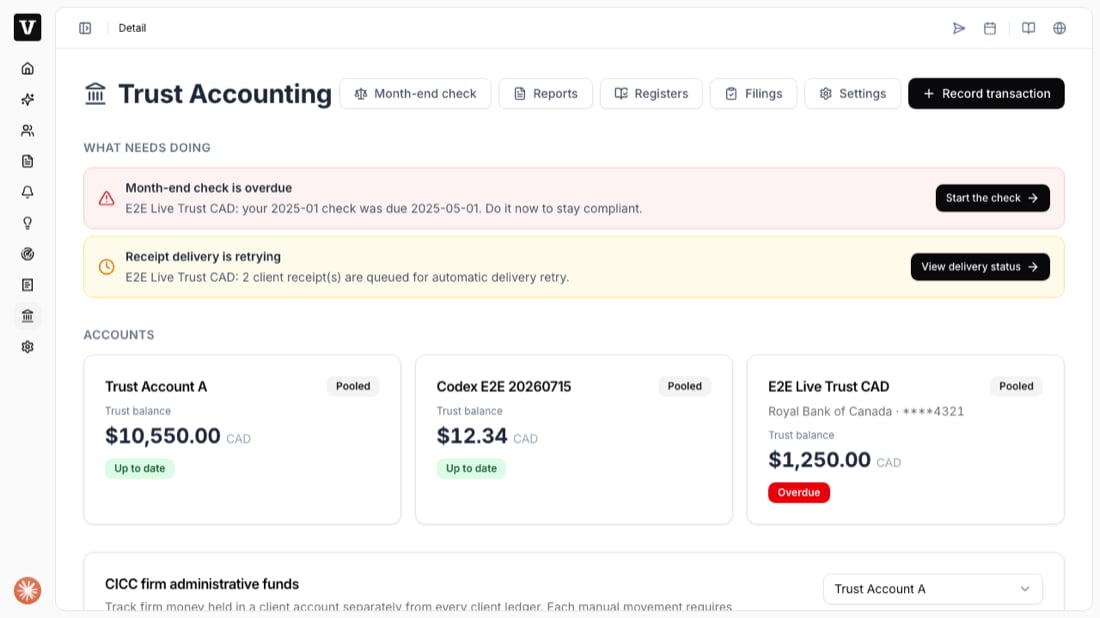 * **What needs doing** — overdue month-end checks and receipts that are retrying, with a one-click action for each.
* **Accounts** — every trust account with its balance and an *Up to date* / *Overdue* status.
* **Record transaction** — the button you use to record a deposit, pay a bill, take an earned fee, refund, or transfer.
* **Month-end check, Reports, Registers, Filings, Settings** — the tabs across the top.
## What you can do here
| Task | Where | When |
| ------------------------ | ------------------------------- | ------------------------------------------------ |
| Set up an account | Settings | Once, before your first deposit |
| Record a deposit | Record transaction → Deposit | Every time client money comes in |
| Pay a bill for a client | Record transaction → Pay a bill | When you spend from trust on the client's behalf |
| Month-end reconciliation | Month-end check | Every month |
## Before you start
Your firm's regulator and trust settings must be configured first. If you have not done this yet, start with [Set up a trust account](/knowledge-base/knowledge-base/trust-accounting/set-up-account). Once an account is ready, [record your first deposit](/knowledge-base/knowledge-base/trust-accounting/record-a-deposit).
The ledger is **append-only**: you never edit or delete a recorded transaction. To fix a mistake you void it, which posts an equal, opposite entry — both stay on the record so your audit trail is always complete.
* **What needs doing** — overdue month-end checks and receipts that are retrying, with a one-click action for each.
* **Accounts** — every trust account with its balance and an *Up to date* / *Overdue* status.
* **Record transaction** — the button you use to record a deposit, pay a bill, take an earned fee, refund, or transfer.
* **Month-end check, Reports, Registers, Filings, Settings** — the tabs across the top.
## What you can do here
| Task | Where | When |
| ------------------------ | ------------------------------- | ------------------------------------------------ |
| Set up an account | Settings | Once, before your first deposit |
| Record a deposit | Record transaction → Deposit | Every time client money comes in |
| Pay a bill for a client | Record transaction → Pay a bill | When you spend from trust on the client's behalf |
| Month-end reconciliation | Month-end check | Every month |
## Before you start
Your firm's regulator and trust settings must be configured first. If you have not done this yet, start with [Set up a trust account](/knowledge-base/knowledge-base/trust-accounting/set-up-account). Once an account is ready, [record your first deposit](/knowledge-base/knowledge-base/trust-accounting/record-a-deposit).
The ledger is **append-only**: you never edit or delete a recorded transaction. To fix a mistake you void it, which posts an equal, opposite entry — both stay on the record so your audit trail is always complete.