> ## Documentation Index
> Fetch the complete documentation index at: https://visaflo.ca/knowledge-base/llms.txt
> Use this file to discover all available pages before exploring further.
# Month-End Reconciliation
> Prove each month that your trust bank balance matches what you owe clients, then sign off to lock the period.
Every month you must prove that the money in your trust bank account matches what your books say you owe clients. VisaFlo walks you through it in four steps and locks the month once you sign off.
This is a genuine **three-way** reconciliation: your adjusted bank statement, your trust journal, and the sum of your client ledgers all have to agree. VisaFlo blocks sign-off until they do.
## Start the check
Open **Trust Accounting → Month-end check**. Overdue months are flagged on the home screen too. Press **Start the check** for the account and month you're reconciling.
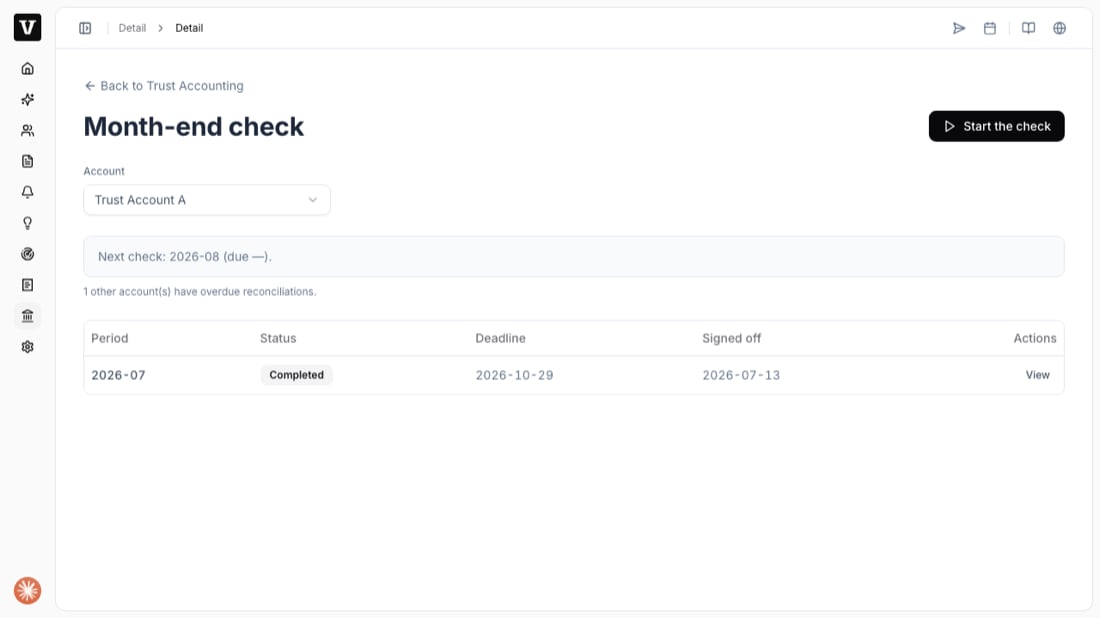 Months lock **in order** and a completed reconciliation **can't be undone**. Reconcile the earliest open month first; a gap would strand entries that can never be covered.
## The four steps
The check runs as a wizard: **Statement → Matching → Review → Sign-off**.
Months lock **in order** and a completed reconciliation **can't be undone**. Reconcile the earliest open month first; a gap would strand entries that can never be covered.
## The four steps
The check runs as a wizard: **Statement → Matching → Review → Sign-off**.
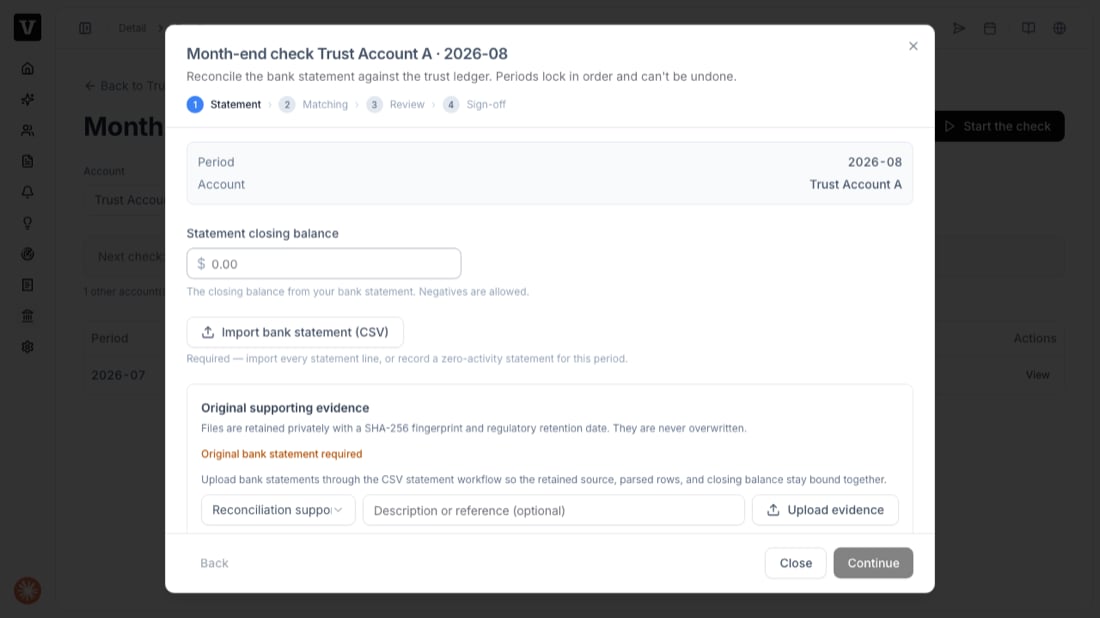 Enter the **statement closing balance** from your bank statement, then **Import bank statement (CSV)** so every statement line is loaded. Upload the **original bank statement** as evidence — files are retained privately with a fingerprint and never overwritten. Press **Continue**.
Match each bank line to the trust ledger entry it corresponds to. VisaFlo suggests a match when there's exactly one candidate (same direction, same amount, within a few days); otherwise you pick from the candidates. A bank line with no ledger entry (like a pure bank fee) can be **ignored** with a reason.
Review the three balances. If they don't agree, VisaFlo tells you why — an out-of-balance book, a shortage (bank less than obligations), or an unexplained surplus — and won't let you sign off until it's resolved.
Confirm the attestation and sign. If independent review is on, the signer must be different from the preparer. Signing **locks the period**.
## After sign-off
The month is locked and becomes a signed regulatory record. You can view it any time under **Month-end check**, and it feeds the year-end compliance pack under **Reports**.
Found a mistake in a locked month? You don't reopen it. Post a correcting (reversing) entry in the current open month and reconcile that month — the paper-ledger way.
## Troubleshooting
* **"Period out of order"** — an earlier month isn't reconciled yet. Do the earliest open month first.
* **Can't sign off** — the three balances don't agree, or a bank import is still in progress. Resolve the difference the Review step shows.
* **Shortage detected** — the bank holds less than you owe clients. VisaFlo opens a shortage incident automatically; assess, restore, and (if required) report it, then complete the balanced reconciliation.
* **"Self approval"** — independent review is on and you prepared this check. A different team member must sign it.
Enter the **statement closing balance** from your bank statement, then **Import bank statement (CSV)** so every statement line is loaded. Upload the **original bank statement** as evidence — files are retained privately with a fingerprint and never overwritten. Press **Continue**.
Match each bank line to the trust ledger entry it corresponds to. VisaFlo suggests a match when there's exactly one candidate (same direction, same amount, within a few days); otherwise you pick from the candidates. A bank line with no ledger entry (like a pure bank fee) can be **ignored** with a reason.
Review the three balances. If they don't agree, VisaFlo tells you why — an out-of-balance book, a shortage (bank less than obligations), or an unexplained surplus — and won't let you sign off until it's resolved.
Confirm the attestation and sign. If independent review is on, the signer must be different from the preparer. Signing **locks the period**.
## After sign-off
The month is locked and becomes a signed regulatory record. You can view it any time under **Month-end check**, and it feeds the year-end compliance pack under **Reports**.
Found a mistake in a locked month? You don't reopen it. Post a correcting (reversing) entry in the current open month and reconcile that month — the paper-ledger way.
## Troubleshooting
* **"Period out of order"** — an earlier month isn't reconciled yet. Do the earliest open month first.
* **Can't sign off** — the three balances don't agree, or a bank import is still in progress. Resolve the difference the Review step shows.
* **Shortage detected** — the bank holds less than you owe clients. VisaFlo opens a shortage incident automatically; assess, restore, and (if required) report it, then complete the balanced reconciliation.
* **"Self approval"** — independent review is on and you prepared this check. A different team member must sign it.