> ## Documentation Index
> Fetch the complete documentation index at: https://visaflo.ca/knowledge-base/llms.txt
> Use this file to discover all available pages before exploring further.
# Branded Email Address
> Verify your sending domain and configure staff sender addresses for outbound email.
## Add and verify your domain
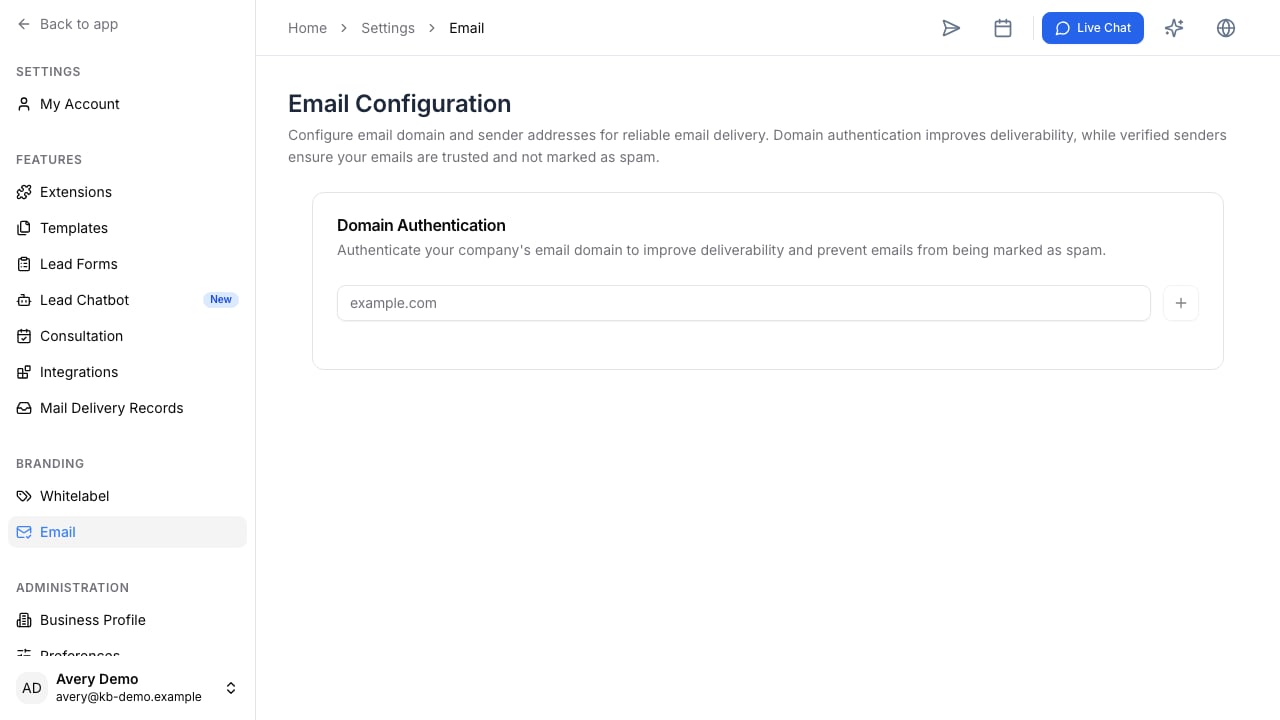
Open **Settings**, then **Email Configuration**. Add the domain your firm uses for client communication and copy the required DNS records into your domain provider. Keep the records in place until the configuration shows that the domain is verified.
 ## Configure staff senders
After the domain is verified, each staff member can configure the sender address they use under that domain and set an email signature. Use a sender address that the recipient can reply to and keep signatures consistent with your firm’s contact details.
## Before sending client email
Send a test email to an internal address first. Confirm the From address, reply-to behaviour, signature, and delivery. Then use the configured sender in Email Composer for client or lead messages.
## Troubleshooting
DNS changes can take time to propagate. If verification does not complete, compare the host, record type, and value with the Email Configuration screen and remove conflicting records only when you are sure they are obsolete. If a team member has no sender option, confirm that the company domain is verified and that their user address is configured.
## Configure staff senders
After the domain is verified, each staff member can configure the sender address they use under that domain and set an email signature. Use a sender address that the recipient can reply to and keep signatures consistent with your firm’s contact details.
## Before sending client email
Send a test email to an internal address first. Confirm the From address, reply-to behaviour, signature, and delivery. Then use the configured sender in Email Composer for client or lead messages.
## Troubleshooting
DNS changes can take time to propagate. If verification does not complete, compare the host, record type, and value with the Email Configuration screen and remove conflicting records only when you are sure they are obsolete. If a team member has no sender option, confirm that the company domain is verified and that their user address is configured.